CLAUDE.md 怎麼寫?2026 記憶、Rules、Skills 與 5 種任務模板教學
CLAUDE.md 2026 教學:用 5 種任務模板寫專案規則,分清 auto memory、MEMORY.md 載入範圍、Rules、Skills 與 Hooks,避免把建議當硬限制。

很多人第一次使用 Claude Code,會把常用 Prompt、專案背景、工作規範與安全限制全部塞進 CLAUDE.md。結果檔案越寫越長,模型每次都讀到大量無關資訊,真正重要的規則反而被埋住。
比較實用的原則是:CLAUDE.md 只保留「幾乎每次工作都需要知道」的內容。特定任務流程放進 Skill,必須強制執行或阻擋的動作則交給 Hook 與權限設定。
2026 年的官方文件也把手寫指令與自動記憶分開。先釐清哪些是團隊規則、哪些是模型自己的筆記,再整理檔案,才不會把不同機制的限制混用。
CLAUDE.md 2026 更新:手寫規則與自動記憶怎麼分?
CLAUDE.md 是你主動寫下的持續指令,auto memory 則是 Claude 根據修正與偏好累積的筆記。兩者都會提供背景,但都不是強制權限機制,重要限制仍要透過設定與檢查落實。
官方支援用 AGENTS.md 作專案指令,但預設要在工作目錄及上層沒有 CLAUDE.md、.claude/CLAUDE.md 或 CLAUDE.local.md 才會載入。
既有專案若已有這些檔案,不能推定新建的 AGENTS.md 會自動一起生效。
若要一起載入,可在 /config 的 Project instructions 選擇 claude-md-and-agents-md,或依官方文件用 @AGENTS.md 匯入。
再用 /memory 查看實際載入路徑,避免不同工具讀到不同規則。
自動記憶的 MEMORY.md 是索引:每次對話開始載入前 200 行或前 25KB,以先到的門檻為準。
超出部分不會在開始時載入,這項門檻只限制開始時載入的索引內容,詳細記憶仍可另外存放,也不會把 CLAUDE.md 變成只能寫 200 行。
可用 /memory 檢查記憶與相關檔案。背景或雲端環境的自動記憶設定可能不同,因此不能只因桌面上有筆記,就推定所有工作階段都會自動寫入。
只在特定檔案需要的規則,可放進 .claude/rules 並設定路徑範圍。用 import 拆檔有助整理,但被匯入的內容仍一起載入,不會因此自動減少背景文字用量。
2026 更新資料來源:Claude Code 記憶官方文件。
CLAUDE.md 是什麼?
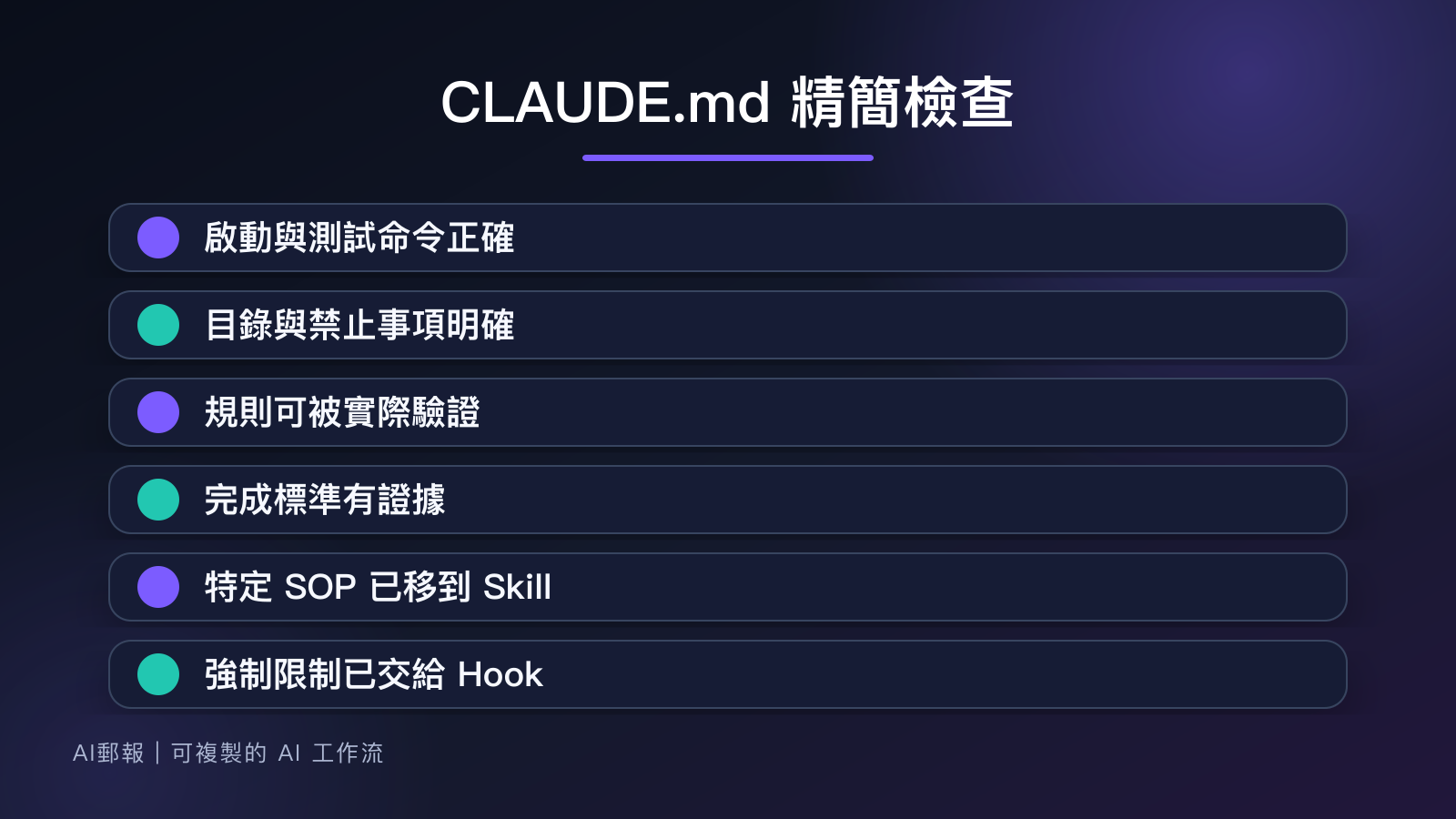
CLAUDE.md 是 Claude Code 讀取的專案說明文件。它可以告訴 Agent 專案結構、啟動方式、測試命令、程式慣例與完成標準,減少每次重新解釋。
但它提供的是 context,也就是工作背景,不是強制執行機制。即使寫了「禁止刪除資料」,仍不應把它當成安全邊界。真正需要阻擋的命令,應使用權限或 PreToolUse Hook。Hook 是在特定工作事件發生時,自動執行的命令或檢查。
哪些內容該寫,哪些不該寫?
適合寫入的內容有四類:
- 專案如何啟動、測試、lint 與 build。
- 穩定的目錄分工與命名規則。
- 不可隨意修改的區域與資料處理原則。
- 任務完成前一定要留下的驗證證據。
不適合寫入的內容包括單一功能的完整 PRD、短期活動文案、過期事故紀錄、數百行操作 SOP,以及只對某個人有效的偏好。這些資料應放在 feature spec、Skill 或獨立文件,再由任務 Prompt 指向它。
一個簡潔的基礎版本可以這樣寫:
# Project guide

## Commands
- Install: npm ci
- Dev: npm run dev
- Test: npm test
- Lint: npm run lint
- Build: npm run build

## Structure
- src/features: product features
- src/components: shared UI only
- tests: integration and end-to-end tests

## Working rules
- Read the relevant feature spec before editing.
- Prefer the smallest change that satisfies acceptance criteria.
- Do not change public API behavior without approval.
- Do not edit generated files manually.

## Done when
- Relevant tests pass.
- Lint and type checks pass.
- Report changed files, verification results, and unverified risks.
5 種可直接複製的任務模板
下面不是五份都要塞進同一個檔案,而是依專案類型選擇必要段落。
1. 前端功能模板
## Frontend
- Reuse existing components and design tokens first.
- Cover loading, empty, error, disabled, and success states.
- Keep keyboard navigation and visible focus states.
- Verify desktop and mobile layouts.
- Do not add animation before the static hierarchy is correct.
2. 後端 API 模板
API 是讓不同系統交換資料的介面。規則要同時描述輸入、錯誤與相容性。
## Backend API
- Validate inputs at the boundary.
- Preserve existing response fields unless the spec says otherwise.
- Return actionable errors without exposing secrets.
- Add tests for authorization, invalid inputs, and duplicate requests.
- Describe migration or rollback impact before schema changes.
3. 測試任務模板
## Testing
- Reproduce the reported failure before changing code.
- Prefer behavior-level assertions over implementation details.
- Cover one normal case and the relevant boundary or failure cases.
- Never delete a failing test only to make the suite pass.
- Record the exact command and result.
4. 資料庫修改模板
## Database
- Inspect the existing schema and migration convention first.
- Separate reversible schema changes from data backfills.
- Do not run production mutations without explicit approval.
- Explain lock, compatibility, and rollback risks.
- Verify old and new application versions when rolling deployment matters.
5. PM 驗收模板
## Product acceptance
- Map every change to an acceptance criterion.
- Flag ambiguous product decisions instead of guessing.
- Prepare evidence for normal, empty, error, and permission states.
- Separate confirmed results from assumptions.
- Stop when a missing decision would materially change the experience.
停止條件比「請小心」更有用
「請小心不要改壞」很難執行。停止條件則告訴 Agent,遇到什麼情況不能自行往下做。
建議至少加入:
## Stop and ask when
- Requirements conflict or acceptance criteria cannot be tested.
- A change requires deleting user data or rewriting shared history.
- Required credentials, production access, or business decisions are missing.
- Tests fail for an unknown reason after the scoped change.
- The smallest safe fix would exceed the requested scope.
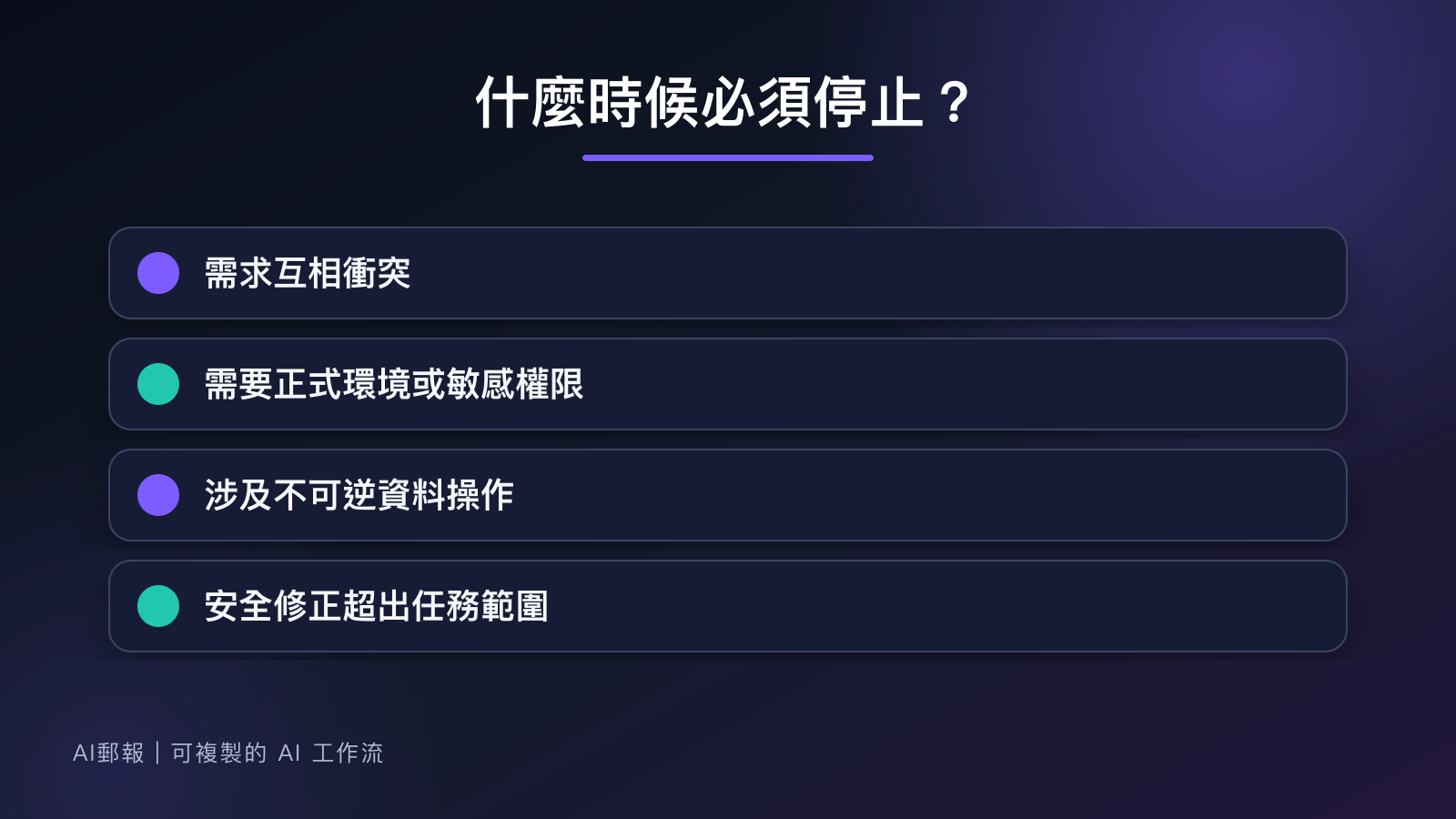
好的停止條件不會讓 Agent 每一步都問問題,而是只攔住不可逆、涉及權限或會改變產品方向的情況。
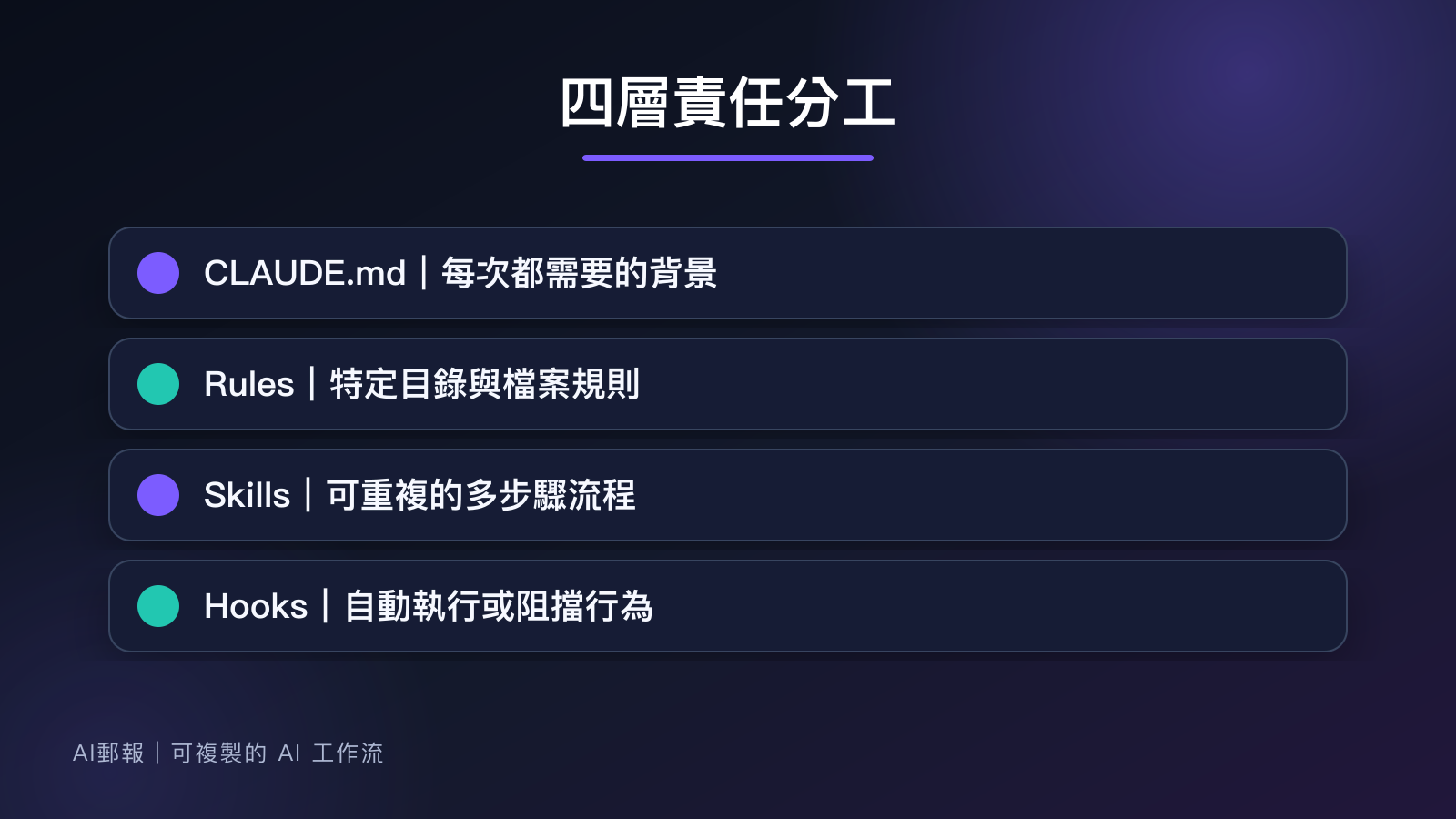
Rules、Skills 與 Hooks 怎麼分工?
| 工具 | 適合放什麼 | 例子 |
|---|---|---|
CLAUDE.md |
每次工作都需要的專案背景 | 指令、結構、完成標準 |
| Rules | 特定目錄或檔案類型的規則 | 修改前端檔案才套用 UI 規範 |
| Skills | 可重複的多步驟流程 | 發布文章、修復事故、產生報表 |
| Hooks | 必須自動執行或阻擋的行為 | 編輯後格式化、阻擋危險命令 |
一段規則如果只在少數任務需要,不要讓它每次都進入 context;一個流程如果有明確步驟、參考檔與驗證腳本,就很適合抽成 Skill。
4 個常見失敗
把 CLAUDE.md 當知識庫
完整文件應留在 docs/。CLAUDE.md 只負責告訴 Agent 去哪裡讀、什麼時候讀。
規則只有抽象形容詞
「保持高品質」無法驗證。改成「執行 npm test 與 npm run lint,並回報未驗證項目」。
把安全要求只寫成文字
涉及正式環境、資料刪除與憑證時,必須搭配實際權限限制,不能只期待模型遵守句子。
一次加入過多規則
先從啟動、測試、禁止事項與完成標準四類開始。遇到重複錯誤後再補規則,比先猜出 200 條規定更容易維護。
FAQ
CLAUDE.md 應該控制在幾行?
官方建議每份 CLAUDE.md 盡量少於 200 行,這是幫助維持指令清楚的建議,不是 200 行就無法使用的硬上限。若內容太長,先找重複規則、過時資訊與只對少數檔案有用的要求,再拆成對應規則。
可以放在 Git 裡嗎?
團隊共用規則適合提交版本控制;個人偏好與本機資訊應使用個人層級設定,且不要放入密碼、Token 或正式環境憑證。
修改後需要重新啟動 Claude Code 嗎?
重要指令改動後,可用 /memory 查看載入與記憶設定,再以一個小任務確認。若長工作階段的背景不清楚,重新開始工作階段有助於確認初始化讀到的內容;不要只憑檔案已儲存,就推定行為已符合新規則。
結論
一份好用的 CLAUDE.md 不求完整,而求穩定、短而可驗證。先寫清楚專案怎麼跑、什麼不能動、完成要通過什麼,再把少數任務流程拆到 Skills,把強制限制交給 Hooks 與權限。
如果你想每週收到一套可以直接複製的 AI 工作流、Prompt 與失敗排查方法,歡迎訂閱 AI郵報。