【省錢裝潢】別急著找設計師!教你用 Gemini 免費把 2D 平面圖變成 3D 裝潢圖
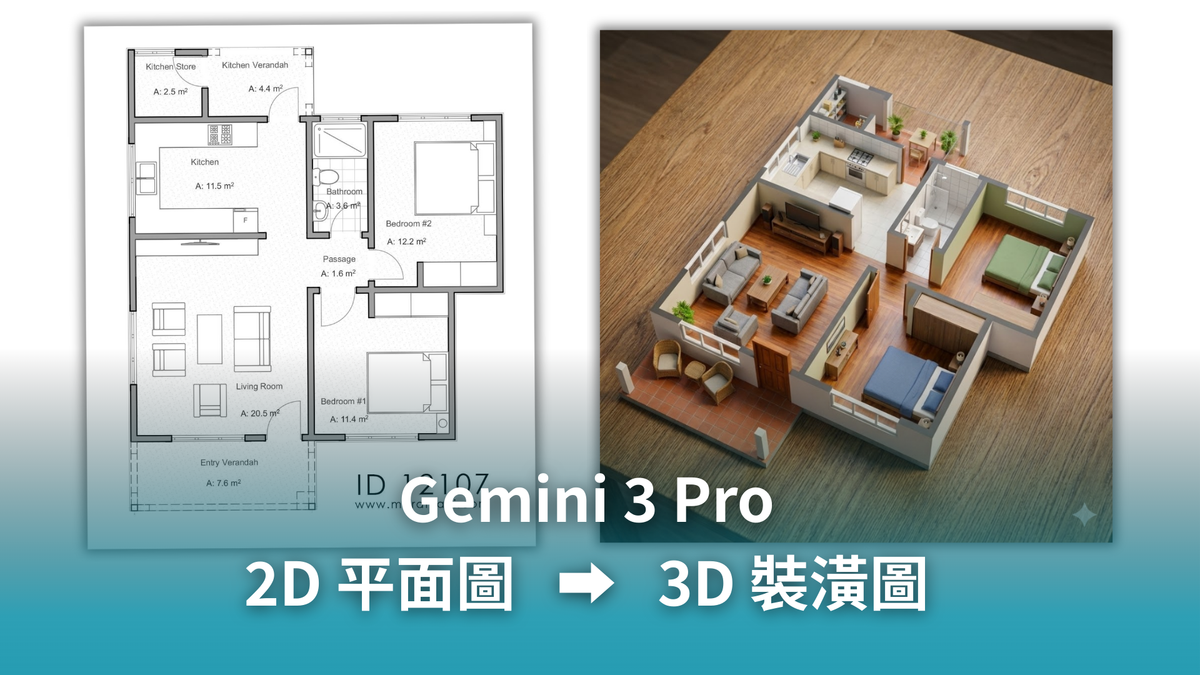
裝潢免花錢!教你用 Gemini 3.0 將 2D 平面圖秒轉 4K 3D 渲染,省下高額設計費,輕鬆預覽夢想家。

還在煩惱室內設計費用嗎?
還在為了高昂的室內設計費縮衣節食嗎?或者看著建商給的那張黑白 2D 平面圖,卻完全想像不出未來的家會長什麼樣子?
現在,你不需要高價聘請室內設計師,你也不需要學習那些複雜難懂的 3D 繪圖軟體。只要用對工具,你也能自己設計出理想的家!
這聽起來很像科幻電影,但我親自實測:
我只把一張普通的 2D 房屋平面圖,丟給 Google Gemini 3.0 Pro(沒錯,就是現在最強大的 AI 模型)。
短短幾秒鐘,它就幫我轉換成一張 4K 畫質的 3D 渲染模型圖。連家具配置、地板材質、光影細節都一次到位。
💡 延伸閱讀:Google 最強黑科技
這是 Google 近期最強大的技術突破,不只是畫圖,連介面都能生成!
 Vicky Tsai
今天這篇文章就要手把手教你,如何用 AI 當你的免費皇家設計師!
為什麼你需要用 Gemini 做這件事?
省下巨額設計費
- 市面上出 3D 圖一張可能就要數千元,AI 是免費的
- 想要強大功能,付費會員一個月也才 20 美元
省錢必看:如何免費使用高階 AI?
 Hank
Hank
溝通無障礙
拿著 3D 圖跟統包師傅或另一半討論,比比手畫腳清楚一萬倍
無限嘗試風格
不喜歡北歐風?一秒換成輕奢風,隨你玩
準備工作:只需要兩樣東西
- 你的房屋平面圖 建商給的電子檔最好,或是你自己手繪並拍照(線條要清楚)也可以。
- Google Gemini 帳號 建議使用 Gemini Advanced (最新的 3.0 Pro 模型),圖像理解與生成能力才是最強的。
第一招:懶人速成法(適合新手)
如果你只想要快速看到房子「變立體」的樣子,看看空間感如何,請用這個簡單指令。
還想看更多嗎?完整內容只對註冊用戶開放喔!
點下方的免費 Subscribe,馬上加入我們~
步驟:
- 上傳你的 2D 平面圖。
- 複製以下英文指令(Prompt)並貼上。
懶人版指令 (Copy this):
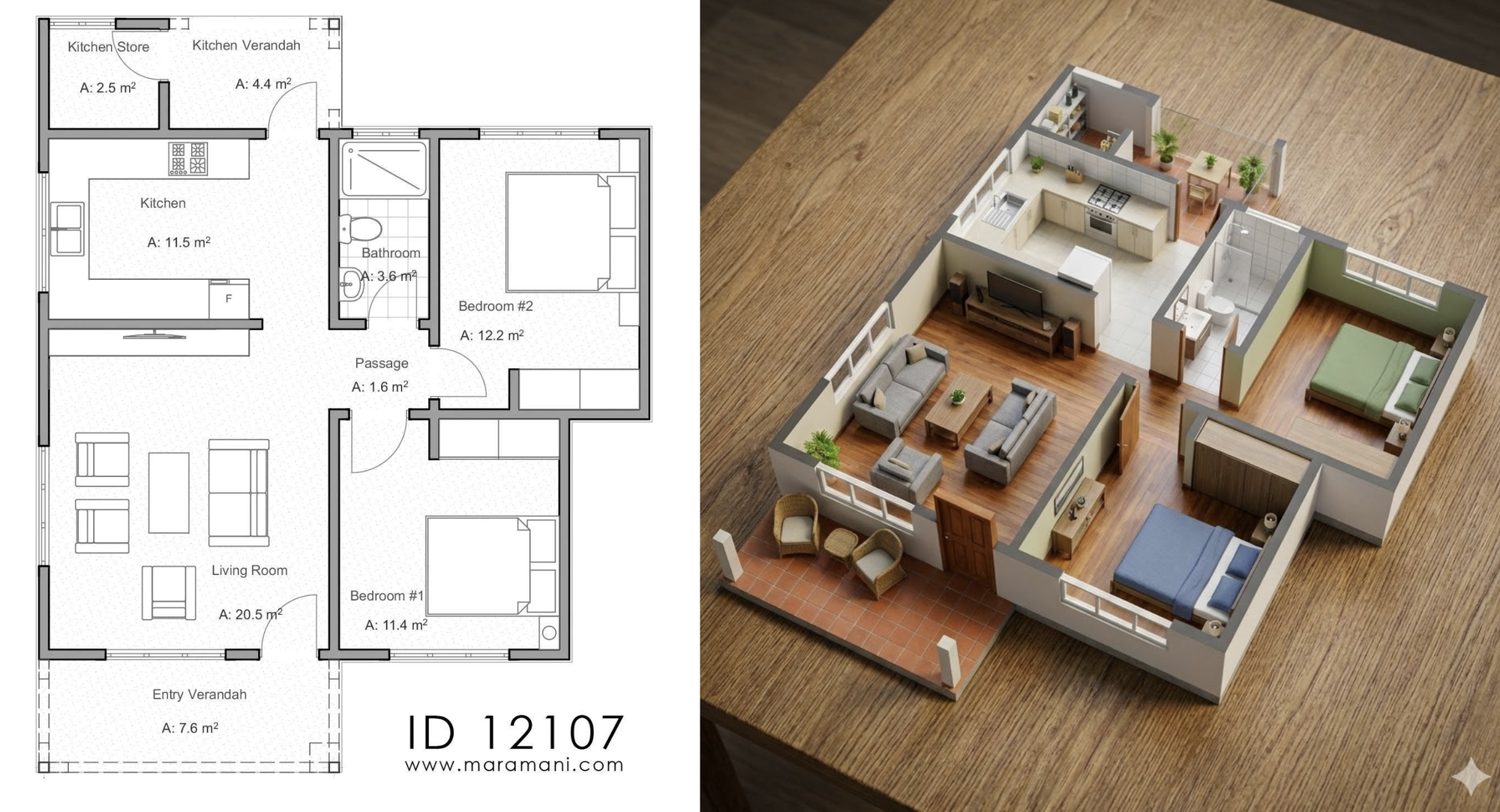
Create photorealistic 3D render of the entire floor plan, seen from afar, to the side, miniature maquette fully colorized render, with furniture inside. Keep the exact same rooms at their location, with the right equipment, but remove the text from the final image. High resolution, pro quality.
這個指令的效果:
它會將你的平面圖變成像是一個「精緻的建築模型(Miniature maquette)」,視角微微傾斜,讓你一眼看清全屋格局。適合用來檢視動線是否流暢。
第二招:豪宅設計師法(客製化風格)
如果你對生活品質有要求
你想要看到大理石地板的光澤、溫暖的間接照明,甚至是像五星級飯店一樣的浴室。
那就需要這組「高級咒語」。
步驟:
- 上傳平面圖。
- 複製以下指令(你可以根據喜好修改括號內的材質,例如把 Marble 改成 Wood)。
奢華版指令 (Copy this):
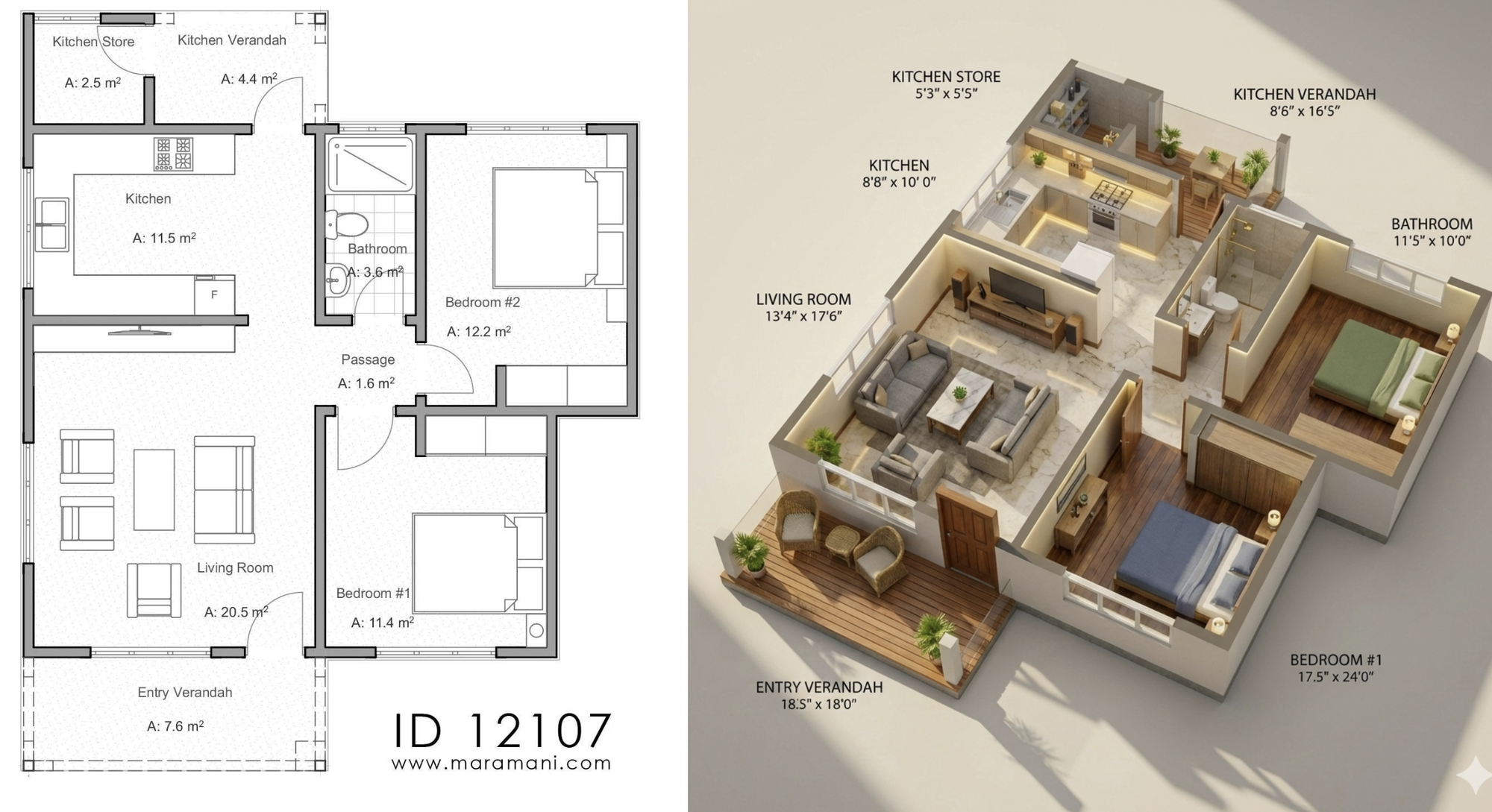
Create a high-end, ultra-luxury 3D floor plan render while preserving the exact layout, walls, proportions, and room placements of the input floor plan.
Transform the materials and aesthetic to premium, upscale, architectural-visualization quality:
• Flooring: polished Italian marble in living/dining areas, rich walnut hardwood in bedrooms, matte textured porcelain in bathrooms.
• Walls: clean satin-finish neutrals, soft indirect lighting along edges.
• Furniture: designer modern furniture, premium fabric textures, elegant detailing, no clutter.
• Kitchen: luxury contemporary design, quartz countertops, warm under-cabinet lighting, high-end appliances.
• Bathrooms: hotel-suite grade with glass partitions, gold/black fittings, premium tiles.
• Balcony/veranda: warm wooden decking, stylish outdoor seating, soft plant lighting.
Lighting & Render Style:
• Ultra-soft sunlight entering from windows, long natural shadows.
• Subtle global illumination, realistic reflections, no distortion.
• V-Ray/Corona style realism: crisp materials, clean edges, premium color grading.
Overall look:
• Warm, luxurious, inviting atmosphere.
• Maintain exact room names and dimensions from the input.
• Keep the camera angle top-down but slightly tilted for depth, like a premium real-estate render.
這個指令的祕密:
我們指定了 Lighting(光影) 和 Materials(材質)。特別是關鍵字 "V-Ray/Corona style",這是專業設計師使用的渲染軟體,加上這句,AI 就會模仿那種高級、乾淨的雜誌質感。
第三招:終極大絕招(指定家具)
這大概是目前最厲害的功能!你是不是在網路上看到了某張「夢幻沙發」或「設計師餐桌」,很想知道它放在你家好不好看?
Gemini 3.0 Pro 擁有強大的多模態(Multimodal)能力,也就是它可以同時「看懂」好幾張圖片。
怎麼做?
- 上傳你的 2D 平面圖。
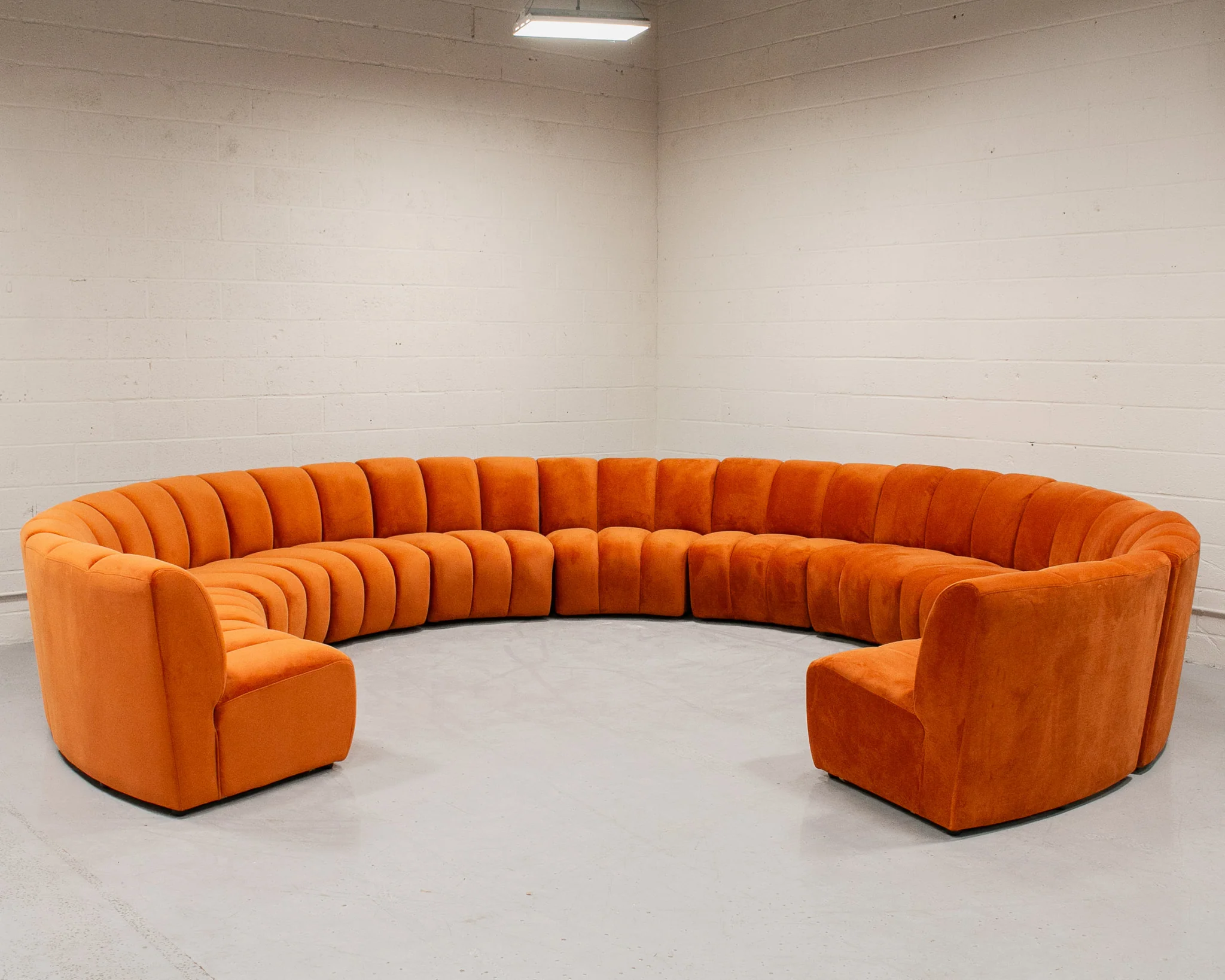
- 同時上傳你想買的 家具照片(例如下面這張橘色的沙發)。
對 Gemini 說:
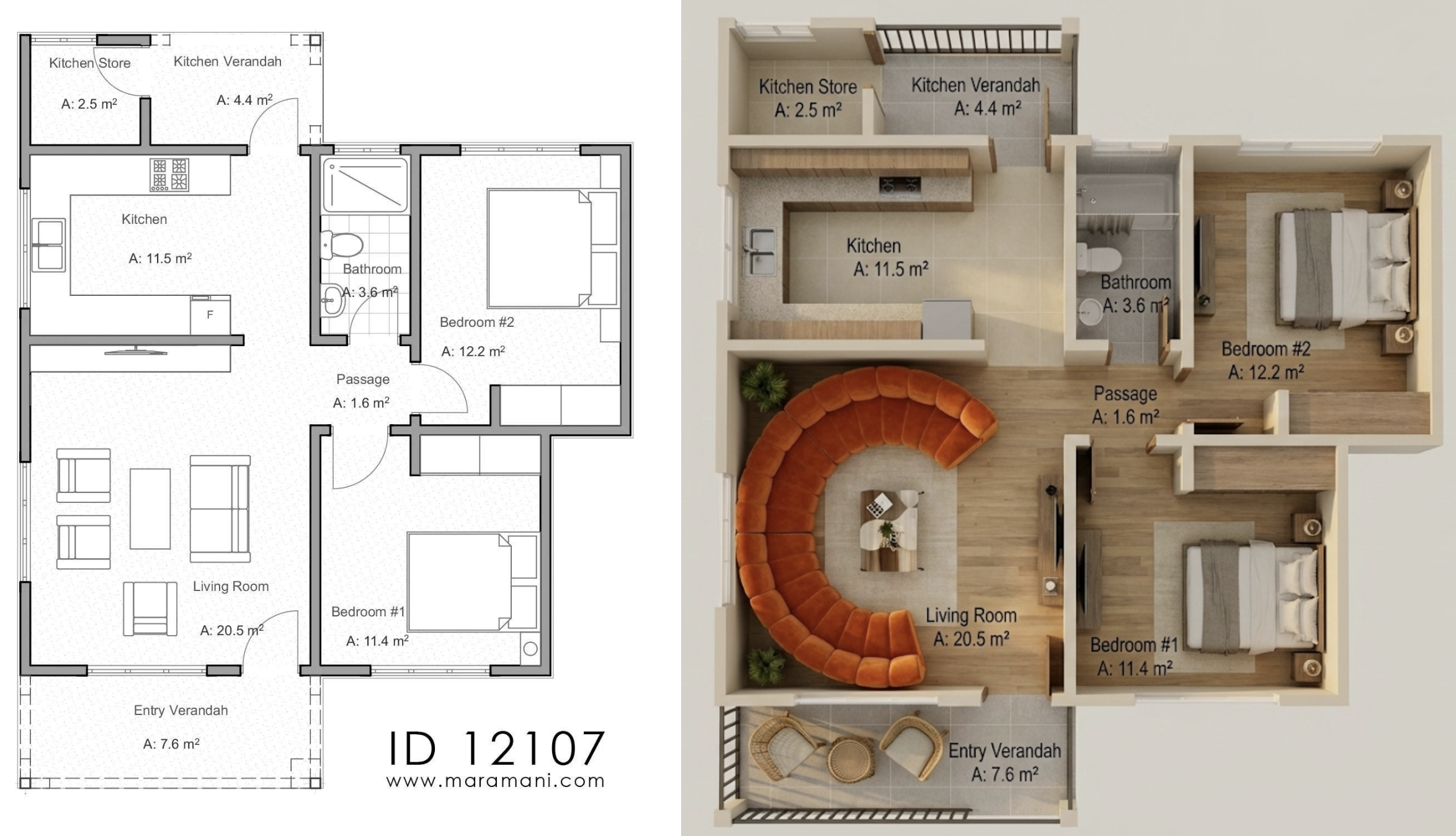
"使用這張平面圖生成 3D 渲染圖,並請將客廳的沙發替換成我上傳的那張橘色沙發的款式與顏色。"
這樣一來,你就能在購買家具前,先用 AI 幫你「試擺」,完全避免買錯家具風格不合的悲劇!
結語
科技進步真的太快了!以前需要專業繪圖員花上一整天的工作,現在用 Google Gemini 喝口咖啡的時間就完成了。無論你是剛買房的首購族,還是想幫老屋換新裝,都強烈建議試試看這個方法。
既然是免費的,為什麼不讓 AI 幫你畫出夢想中的家呢?
 Philo
Philo